A lot of the content behind Pointers, Preprocessor directives, & Classes (I) are quite heavy on notetaking, thus taking me longer than I expected. For the past two days, I haven’t been able to allocate enough time to finish these notes by Thursday 16/10. Hopefully I could finish them by the weekend; if not, possibly by the next lecture review.
The gists of some prereqs have been summarized for you.
Use cases of header files
Improve code readability for other programmers
Reduce chunk of larger files by organizing them into smaller files
Creating a header file
Inside the application folder directory, first create an inc folder and create a header file with a file extension .h
Uploading a header file
Inside the header file, you must follow this template:
#ifndef TYPE_H#define TYPE_H// code here#endif
The reason why we must use ifndef is to prevent multiple files compiling the same header file twice (aka multiple inclusions of the file). Imagine if header B file wants to extract headers from header A, where header A has the type definitions for utilities. Header B may use the same header file (header A) as header C.
Namespace conventions in header files
Using namespace inside a header file is conventionally NOT ALLOWED due to it becoming dangerous for leaking namespaces to consumers (aka the source files) of the header file.
To resolve this issue, you must use the namespace name before the function where the function must originate from that namespace.
cout --> std::coutstring --> std::string
Purposes of header files & source files
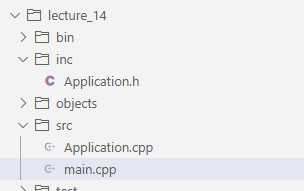
Header files are files under inc folder and source files are under src folder.
Header files are meant to include function definitions, data type definitions, and other kinds of definitions.
Notice how the src files included the utils.h library for the definitions
For example,
utils.h
#ifndef UTILS_H#define UTILS_H// this is #include <anotherHeader.h>// function declarationsint sum(int a, int b);void printMessage(std::string message);// struct declarationsstruct Person { std::string name; int age;};// class declarationsclass randomClass { public: randomClass(); // default constructor};#endif
Source files under src folder run code and use header files to extract the types and definitions.
Application.cpp
Lecture 14
Before we discuss the main.cpp, let’s look into the application.cpp.
inc/Application.h
...struct Person { std::string name; int age;};class Application: public bobcat::Application_{ // Declare your app components here bobcat::Window *window; bobcat::Button *myButton; bobcat::TextBox *message; bobcat::Input *nameInput; bobcat::IntInput *ageInput; std::vector<Person> people; // Also declare functions here (signature only) void handleClick(bobcat::Widget *sender);public: Application();};
In application.cpp, we are constructing the default constructor for the class Application.
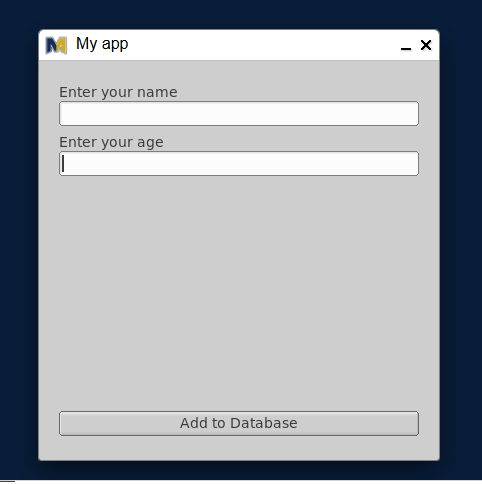
#include <Application.h>#include <bobcat_ui/int_input.h>#include <stdio.h>#include <string>using namespace std;using namespace bobcat;Application::Application(){ // Initialize your app here window = new Window(100, 100, 400, 400, "My app"); myButton = new Button(20, 350, 360, 25, "Add to Database"); message = new TextBox(20, 200, 360, 25, ""); nameInput = new Input(20, 40, 360, 25, "Enter your name"); ageInput = new IntInput(20, 90, 360, 25, "Enter your age"); window -> show(); ON_CLICK(myButton, Application::handleClick);}...
window, myButton, message, nameInput, & ageInput become members of the object of the class Application.
When the main.cpp file creates the application (Application app), it calls for the default constructor (from the example above in line 9) and the initializer aka the default constructor makes the application objects and positions them.
In lines 3-7, the UI elements (aka Widgets) are created with five arguments: position x (1), position y (2), width (3), height (4), & label (5).
Look at line 7 for instance:
ageInput = new IntInput(20, 90, 360, 25, "Enter your age");
ageInput is the member of the class Application
IntInput is a derived class of IntInput
The list of 5 arguments are passed down to the constructor of IntInput
20 is the position x
90 is the position y
360 is the width
25 is the height
"Enter your age" is the label of that int input
After UI elements have been created (in lines 3-7), the window was called to show. window -> show();
Lastly, we registered an ON_CLICK event handler to the myButton and Application::handleClick (line 11)
However, if you notice in the example that Application::handleClick wasn’t declared, Application::handleClick was actually declared outside of the class underneath.
Application::Application(){ // Initialize your app here window = new Window(100, 100, 400, 400, "My app"); myButton = new Button(20, 350, 360, 25, "Add to Database"); message = new TextBox(20, 200, 360, 25, ""); nameInput = new Input(20, 40, 360, 25, "Enter your name"); ageInput = new IntInput(20, 90, 360, 25, "Enter your age"); window -> show(); ON_CLICK(myButton, Application::handleClick);}void Application::handleClick(Widget *sender) { string name = nameInput->value(); int age = ageInput->value(); Person temp = {name, age}; nameInput->clear(); ageInput->clear(); nameInput->take_focus(); people.push_back(temp); cout << "Added " << name << ", " << age << " to collection" << endl; message->label("Hello, " + name + "! It is good to be " + to_string(age) + ".");}
Inside the Application::handleClick, we take the parameter Widget of sender. Widget is a class type of the UI elements as you see with Window, Button, TextBox, Input, & IntInput. (I can also tell you that *sender is a pointer of struct sender.)
In the next lecture review, you will be aware that class is another data structure that shares the same keyword as structs.
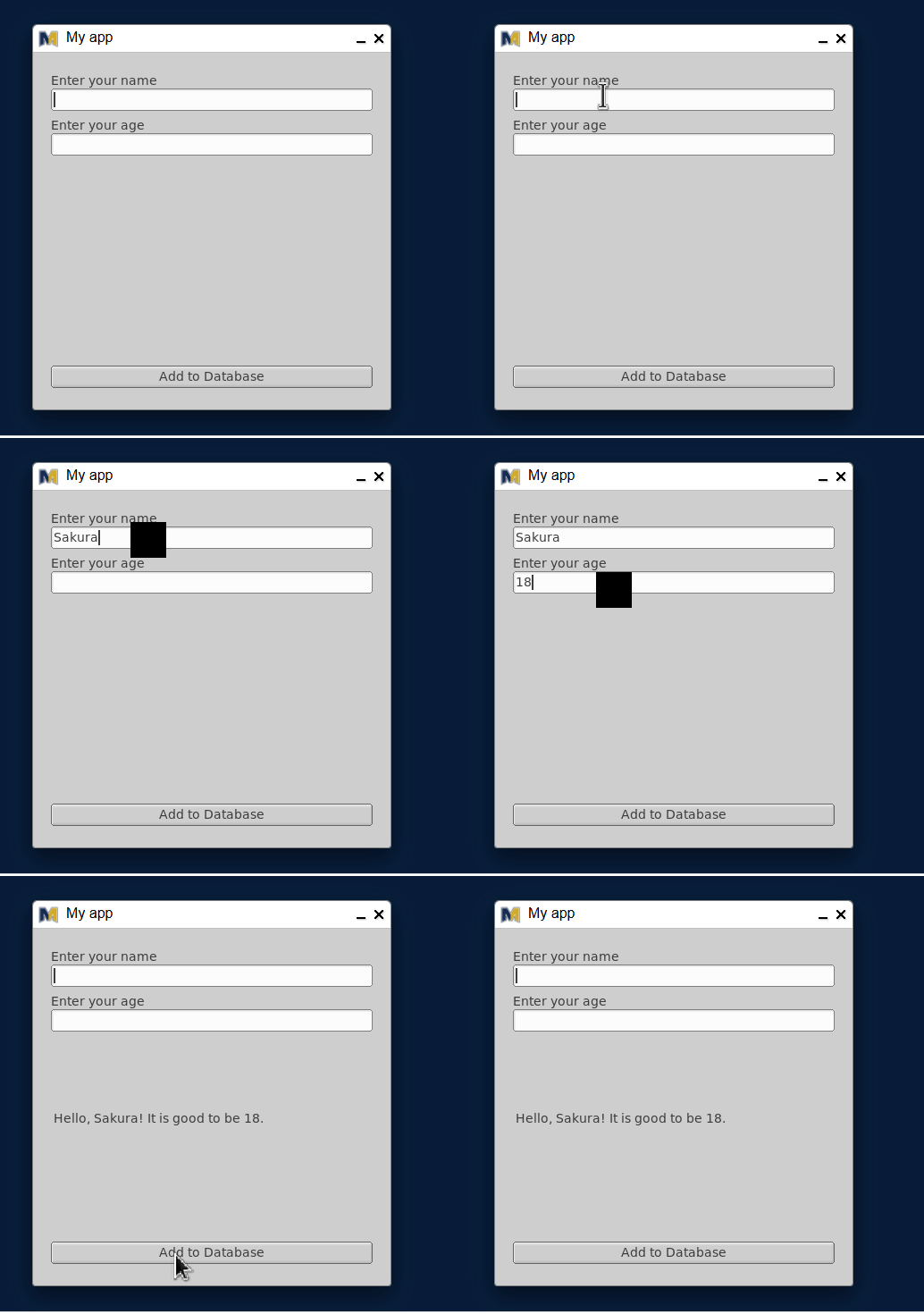
When the user clicks on the button Add to Database, it triggers the handleClick function member of Application (because the event handler binded the button and Application::handleClick in line 11).
The process of the Application::handleClick does as follows:
Retrieve the input value of the nameInput widget and assign it to a string variable
string name = nameInput->value();
Retrieve the input value of the intInput widget and assign it to a int variable
int age = ageInput->value();
Using those two variables from the inputs, we create an object temp of struct Person with the input value
Person temp = {name, age};
After constructing a temp object, we cleared the inputs of those widgets (nameInput & ageInput) so that the user could add another entry to the database. (i.e. makes space for a new input)
nameInput->clear();
ageInput->clear();
5. In addition, we capture the cursor's focus onto the textbox `nameInput` so that the user doesn't have to focus back again on the first input field
```cpp
nameInput->take_focus();
Assuming that there’s a real database, we push the struct object temp into the vector
And print out a message to the console that we successfully added the struct object temp to the database
cout << "Added " << name << ", " << age << " to collection" << endl;
Lastly, we inform the user about their information Hello, [your name]! It is good to be [your age]!
main.cpp
Now that you are aware of what the Application.cpp does, let’s not forget the main.cpp file
#include <Application.h>// This file is complete. No need for further changes// It instantiates your app and runs itint main() { Application app; return app.run();}
As I mentioned earlier, Application app creates the class object app. During this creation, it invokes the default constructor (Application::Application()) to create the widgets of the application like TextBox and so forth.
After the application finishes its initialization, line 9 starts to run the application.
Modifying the Bobcat UI
In lecture 13, you recall that the widget TextBox have the following class members: label, labelfont, labelsize, and align.
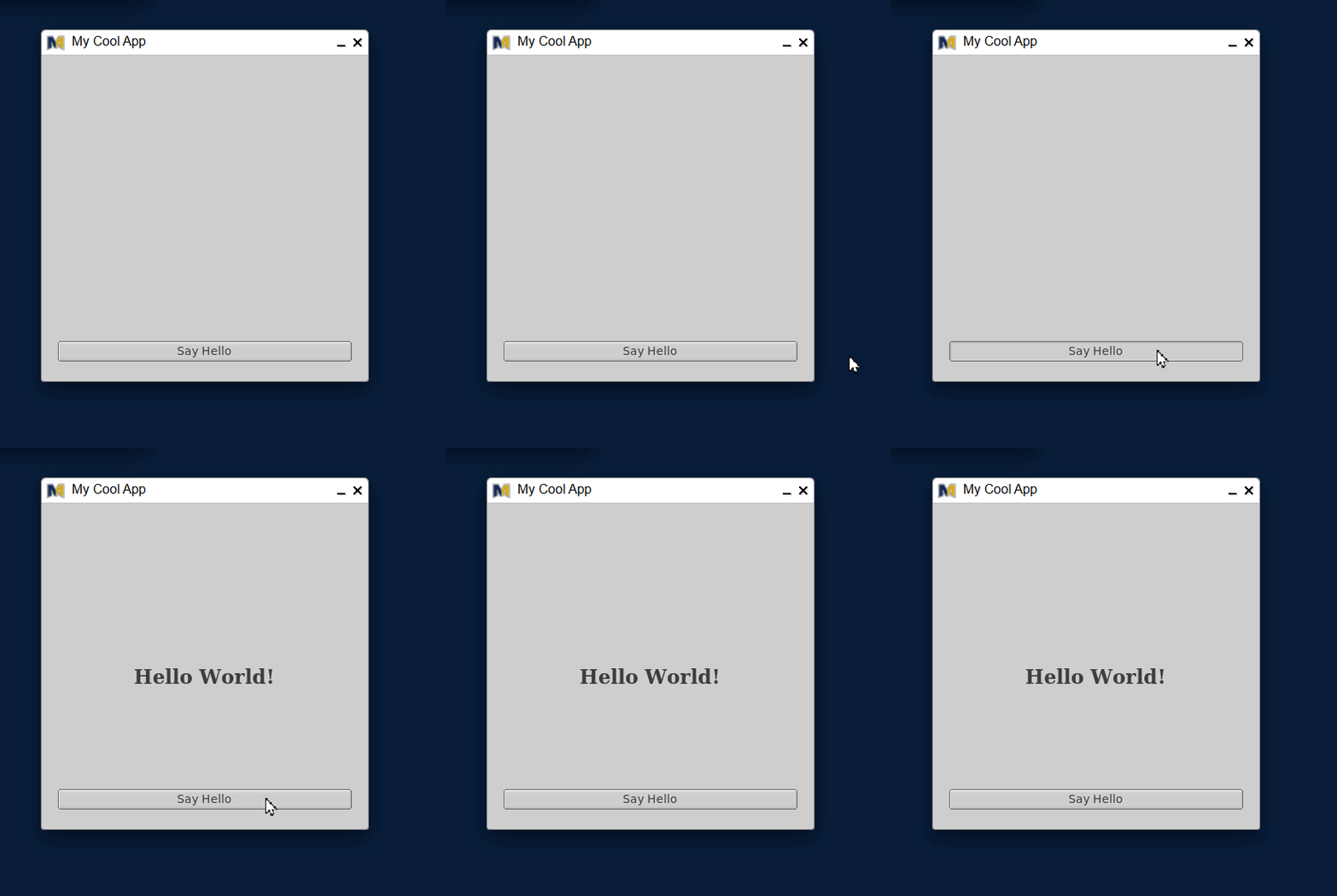
class Application: public Application_ { Window *window; Button *myButton; TextBox *greeting; void handleClick(Widget *sender) { greeting->label("Hello World!"); }public: Application() { window = new Window(100, 100, 400, 400, "My Cool App"); myButton = new Button(20, 350, 360, 25, "Say Hello"); greeting = new TextBox(20, 200, 360, 25, ""); greeting->labelfont(FL_TIMES_BOLD); greeting->labelsize(24); greeting->align(FL_ALIGN_CENTER); window -> show(); ON_CLICK(myButton, Application::handleClick); }};int main() { // Your code here... Application app; return app.run();}
If you look back to Lecture 14, we organized the code with header files so that we don’t create a huge file of types and definitions into one cpp file.
TextBox widget accepts the following functions:
label(string message) — changes the label of the textbox
labelfont(FL_FONT_TYPE font) — changes the font of the textbox
FL_HELVETICA
FL_FREE_FONT
FL_ITALIC
FL_BOLD
FL_BOLD_ITALIC
labelsize(int size) — changes the label size of the textbox
align(FL_ALIGN alignment) — aligns the textbox in the window
FL_ALIGN_CENTER
FL_ALIGN_TOP
FL_ALIGN_BOTTOM
FL_ALIGN_LEFT
FL_ALIGN_RIGHT
There are more types that I haven’t listed out but these are what I have looked at so far
What are header guards and how are they implemented using #ifndef, #define, and #endif in the types.cpp and utils.cpp files?
Why is it important to use header guards in C++ programs, and what problem do they prevent?
How has the original single-file program been reorganized into multiple files (main, types, and utils), and what is the purpose of each file?
What is the difference between a header file and an implementation file in C++, and how are they used in this extended version?
Examine the types.cpp file: what types of declarations belong in a types/structures header file versus a utilities header file?
How does the utils.cpp file use function prototypes (declarations) to make functions available to other files like main?
What include statements are needed in the main.cpp file to access the Bill and Person structs as well as the utility functions?
Why does the utils.cpp header include std::vector<Bill> and std::vector<Person> as parameter types in function declarations, and what does this tell us about dependencies between header files?
What is the purpose of the Application_ base class in the bobcat library, and why does the custom Application class inherit from it?
Explain the role of pointers in declaring GUI components like Window, Button, and TextBox. Why are these declared as pointer types rather than regular objects?
What are the four parameters required when creating a new Window object in the constructor, and what does each parameter represent? (Hint: Look at new Window(100, 100, 400, 400, "My Cool App"))
What is the purpose of the handleClick function in this program, and what type of parameter does it accept?
Explain what the ON_CLICK macro does. What are its two arguments, and how does it connect user interaction to program behavior?
What is the difference between labelfont(), labelsize(), and align() methods used on the TextBox object? What aspect of the GUI do each of these methods control?
Why is it necessary to call window->show() in the constructor? What would happen if this line were omitted?
In the main() function, explain why we create an Application object and call app.run(). What does the run() method do in the context of GUI applications?
What is the purpose of the Person struct in this application, and what data members does it contain?**
Explain the relationship between the Application class and bobcat::Application_. What does inheritance accomplish here?**
What GUI widgets are declared as private members in the Application class, and what is the purpose of each?**
In the Application constructor, what are the parameters used when creating a Window object, and what does each parameter represent?**
What does the ON_CLICK macro do, and how is it used to connect the button to the event handler in this application?**
Describe the steps performed inside the handleClick function when the button is clicked. What happens to the user input?**
What is the purpose of using nameInput->clear(), ageInput->clear(), and nameInput->take_focus() after creating a Person object?**
Explain how the std::vector<Person> people container is used in this application. What type of data structure is it, and what operation adds elements to it?
Author's Note
If you want another group problem about vector of structs, I had done another one in the previous lecture i. Review/CS22/10-09 Lecture 11 & 12. Take a look.
Recommendations
Use functions in header files and good naming conventions to make your code.
If you ever write code, please write lines of code by rows, not columns!!
Individual Questions
These questions ARE for individual practice and similar to group question #1.
Book Library Tracker
Create a struct called Book with the information such as title, author, publicationYear, and isAvailable (hint: bool).
Write a program that:
Declares a vector of Book structs
Adds at least 4 books to the vector using the push_back() method
Uses a loop to traverse (iterate) the vector and display all books published after 2015
Implements a simple search function that takes an author’s name as a parameter and displays all books by that author with their availability status
In the provided code, main.cpp only contains the main() function. Why is it good practice to keep main.cpp minimal and separate the Application logic into different files? Discuss advantages for debugging, testing, and code maintenance.
**Looking at lecture-14-types.cpp, explain why this file uses include guards (#ifndef, #define, endif). What would happen if you included this header file in multiple source files without these guards?**
**The lecture-14-types.cpp file is named “types.cpp” but contains header declarations with include guards. Should this file actually be named with a .h or .hpp extension? Explain the naming conventions and why they matter.**
Why is the Person struct defined in the header file (types.cpp) rather than in application.cpp? What are the benefits of declaring shared data types in header files?
**In main.cpp, the Application class is used without showing an include directive in the snippet. What include statement is missing, and why is it necessary?**
The code uses using namespace std; and using namespace bobcat; in application.cpp but not in the header file. Why is it considered good practice to avoid using namespace declarations in header files?
The Application class contains a member variable std::vector<Person> people;. Explain how this vector is declared and why the angle brackets contain “Person”. What does this syntax mean?
In the handleClick function, a temporary Person struct is created with Person temp = {name, age};. What is this initialization syntax called, and why does it work for structs? Could you use this same syntax for classes?
The code uses people.push_back(temp); to add a Person to the vector. Explain what happens in memory when push_back is called. Does it store a copy or a reference to the temp object?
If you wanted to iterate through the people vector and print all stored names and ages, write the code to do so. Explain why you would need to access the vector through the Application object.
The people vector is declared as a private member of the Application class. What are the implications of this? How would you access or modify this vector from outside the class, and why might you want to keep it private?
The Application class has a constructor Application(); declared in the header and defined in application.cpp. Why is the constructor declaration separated from its implementation? What are the compilation and linking steps involved?
Looking at the Application constructor, it initializes several pointer members (window, myButton, message, etc.) using the new keyword. Why aren’t these pointers initialized in the class declaration itself? What is the difference between declaration and initialization for class members?
The Application class inherits from bobcat::Application_ using public inheritance. If Application_ has a default constructor, will it be called before the Application constructor body executes? Explain the order of constructor execution in inheritance.
The handleClick function is declared as void handleClick(bobcat::Widget *sender); in the header. Why does it need the Widget pointer parameter even though the parameter isn’t used in the function body? What does this tell you about event handler function signatures?